
Steps to Set Up Event Drive Marketing Campaigns in Shortcuts Cloud
This campaign targets clients who haven’t visited in six weeks and have no future appointments. It sends out daily at 9:00 AM.
1. Go to pos.shortcutssoftware.com, log in, and navigate to Messages.
2. Under Messages you will see different Message Types:
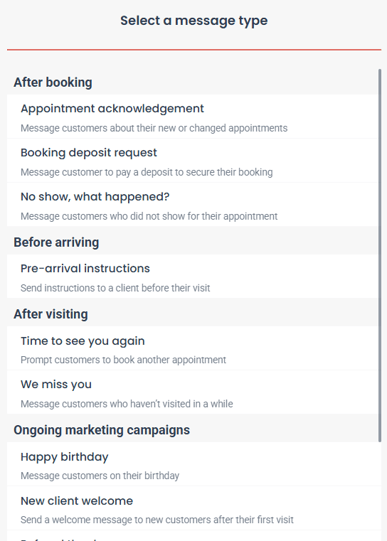
3. Select the Message Type you would like to use and setup the send options such as Send Schedule and any demographics relevant to each different campaign:
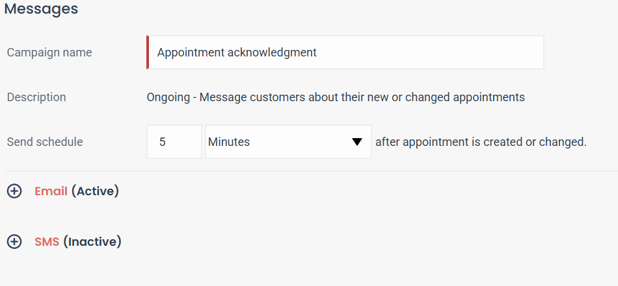
-
- Logo or Display Image: Upload a business logo or a feature image.
- Subject Line: Use a friendly reminder like:
- "It’s Time to See You Again" (default)
- "Did You Forget to Book?"
- Email/SMS Body: Use or edit the default text to make it personalized and relevant to your business.
- Include or exclude addition features (email only):
- Book Now button
- Check-In button
- Exclusive offer
- Sign-Off: Add a professional closing that aligns with your brand.
-
Test and Activate:
- Preview the email/sms and send a test to ensure accuracy.
- Click the green button to activate the campaign. A green highlight will appear next to the email/sms to confirm activation.
SMS Campaign Notes
- Keep messages under 138 characters to ensure it only goes in 1 SMS.
- Include your online booking link for convenience.
Tips for Success
- Personalization: Ensure the language reflects your brand and resonates with your clients.
- Offers: Including a special discount or promotion can increase engagement.
- Testing: Always send a test email or SMS to yourself to confirm accuracy.
- Monitoring: Once activated, monitor your campaigns for effectiveness and adjust if necessary.