
If you'd like to include SMS in your marketing campaigns while keeping your SMS costs to as minimum as possible, a great strategy is to send your campaign by email wherever possible and only send an SMS when an email won't be delivered.
This allows you to maximise the reach of your marketing while using SMS as a backup channel, helping you stay within your SMS budget without missing customers who don't have a valid email address.
Step 1.
First you will need to activate an email for the campaign to send where an email is available. (If you do not setup an email campaign, the SMS campaign will override and to go to all clients as there is no email to be sent.)
For help on setting up an email campaign, follow the instructions here.
Step 2.
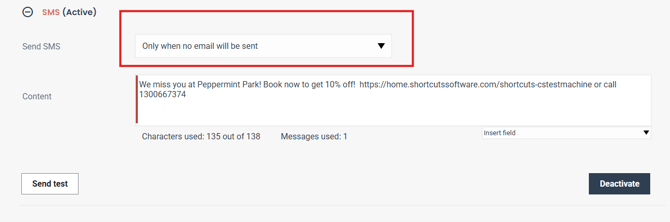
Activate the SMS for your campaign and ensure the Send SMS field has "only when no email will be sent" selected in the drop list (Note, if you had an SMS already active, you will need to deactivate it first, change this setting in the drop list, then reactive your SMS campaign)
Please note these same steps can be setup for your recurring marketing messages (new clients, birthdays, non returning clients) and onces off campaigns .