
What the AI Assistant Does
The AI Assistant BOT transforms salon data into clear, actionable insights in real-time.
Users can simply ask questions like:
- “What were my top-performing staff this week?”
- “How much revenue did we make from colour services in September?”
- “Show me rebooking rates for the last 30 days.
Reports Covered by AI Assistant
The AI Assistant currently draws insights from the following reports within the Shortcuts Cloud “Reports” menu:
- Trading Summary
- Employee Productivity
- Employee Performance
- Targets
Key Capabilities
- Understand financial performance: Review revenue trends, costs, and profitability. Track sales and client behaviour: Identify booking patterns, upsell opportunities, and no-show risks.
- Evaluate employee performance: View rebooking rates, productivity, and service strengths.
- Simplify reporting: No need to navigate menus – just ask in plain English.
- Spot growth opportunities: Gain predictive insights for smarter business decisions
AI Assistant icon button
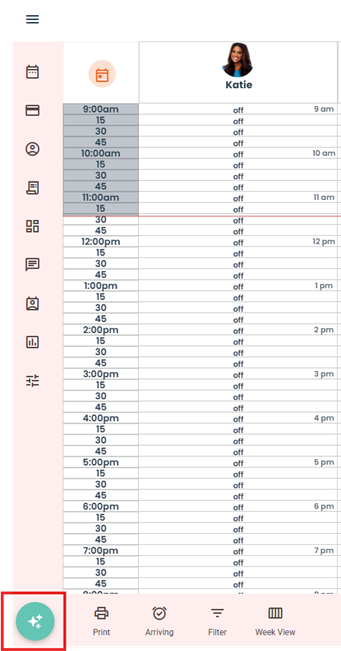
The AI Assistant icon button is now visible on the client’s Cloud interface. Clicking the icon opens a chat window where clients can ask questions about their performance, reports, and KPIs
How to use AI reporting
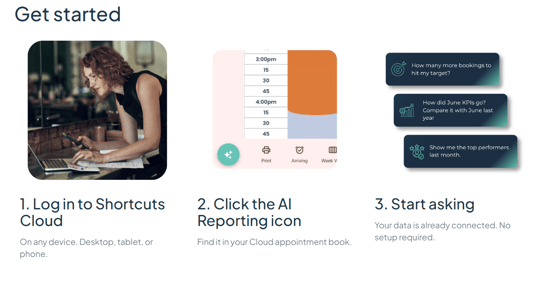
- Click the AI icon in the bottom left-hand corner.
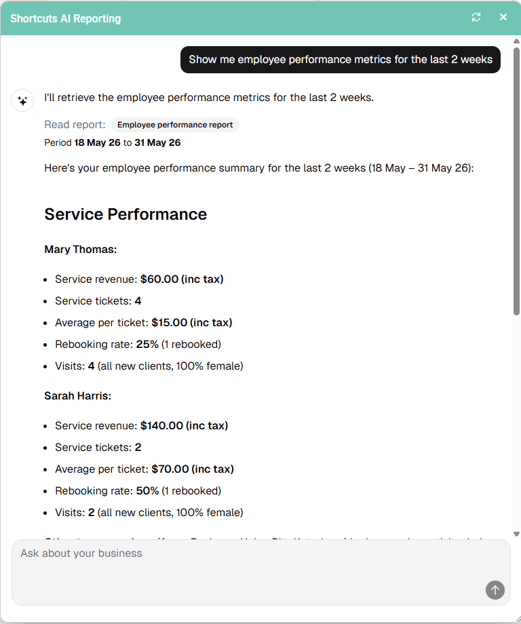
- Enter your question.

4. Click the copy icon if you’d like to copy the information.
Shortcuts AI Reporting
Stop reading reports. Start asking them. Shortcuts AI Reporting gives you instant, plain-language answers about your salon, barber and beauty business’s performance
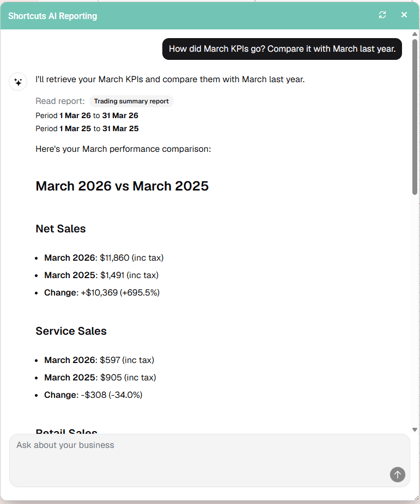
No more digging for your numbers
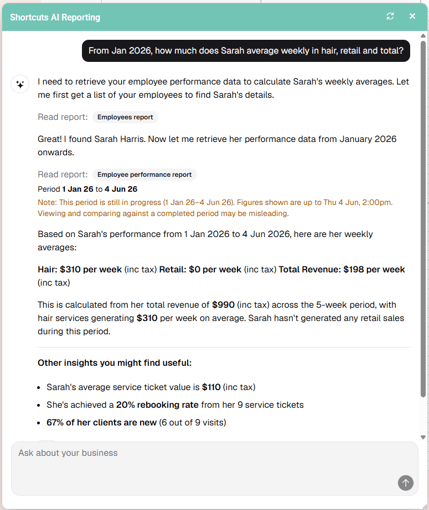
Ask in plain English. Get a full, structured answer immediately.
The same answer that used to take ten minutes now takes ten seconds.
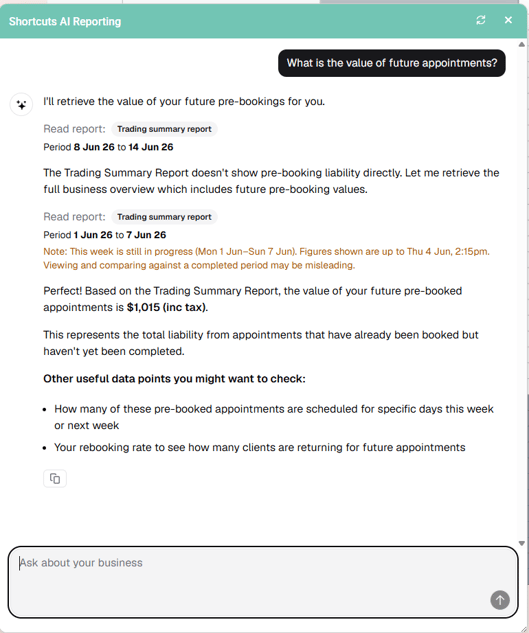
Know what's coming, not just what happened
Ask for the value of future pre-booked appointments and get a dollar figure for the week ahead. Helps owners plan staffing and cash flow proactively.
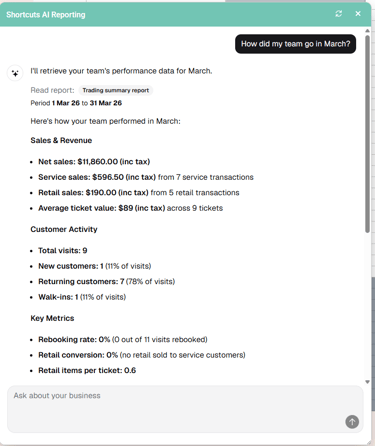
Real-time business clarity
-
Revenue, ticket averages
-
Rebooking rates
-
Retail conversion, upsells
-
Payment splits
-
All from a single conversation, live from your data.
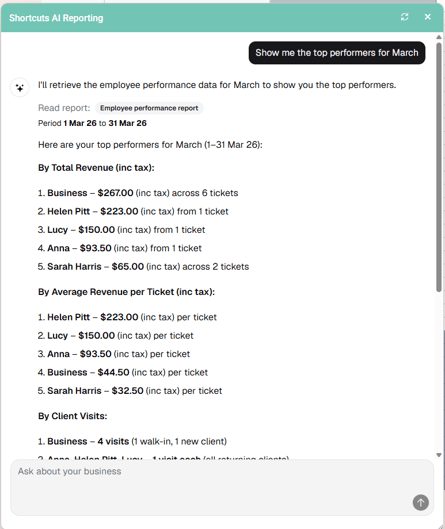
Coach your team on real-time performance data
Deep dive into individual staff results: revenue vs. team average, rebooking rate, new client acquisition. With a plain-English narrative identifying exactly where to coach.
Shortcuts AI Reporting FAQs
All of your Shortcuts AI Reporting questions answered.
What is Shortcuts AI Reporting?
Shortcuts AI Reporting is a conversational chat assistant built directly into Shortcuts Cloud. You ask plain-language questions about your business revenue, staff performance, rebooking rates, future pipeline, and get instant, structured answers. No report navigation, no exports, no date filters.
Is there an additional cost?
No. Shortcuts AI Reporting is included at no extra charge in the Shortcuts Summit package. It is a core part of the subscription, not a paid add-on or separate module. If you are on a different plan, speak to your Customer Success Manager about upgrading to unlock access.
Where do I access it?
AI Reporting is available exclusively on Shortcuts Cloud. It is not available on on-premises installations. You can access it from any device — desktop, tablet, or mobile — by logging into your Shortcuts Cloud account and clicking the AI Reporting icon.
What can I ask it?
You can ask anything related to your business performance. Topics include: revenue and ticket averages, staff performance and rebooking rates, retail conversion, upsells, target tracking, payment splits, and the value of future pre-booked appointments.
Will it replace my existing reports?
No. AI Reporting makes your existing reports easier and faster to access — it does not replace them. All underlying reports remain available in full through the Shortcuts Cloud menu.
How accurate is the data?
The AI draws directly from your live Shortcuts reports, so the figures reflect your actual business data in real time. As with any AI-generated output, we recommend verifying numbers independently before using them for significant business decisions. A terms and conditions disclaimer is displayed within the chat interface.
Which reports does it draw from?
The AI Reporting connects to four core reports in your Shortcuts Cloud menu: Trading Summary, Employee Productivity, Employee Performance, and Targets. It cannot access product or service catalogue data, appointment-level service type breakdowns, or information outside these four reports.
How does it work with employee role permissions?
The assistant appears for all users but is restricted by the role permissions the logged in user has access to. If a question is asked regarding trading data for example when access to the Trading Summary is denied the assistant's default response is £0/$0. The assistant will only provide actual responses to questions regarding the reports the user as access to view.
Salon AI Delivers Real-Time Answers About Your Business | Shortcuts